Storage: from NBD/RAID to Longhorn
Three distributed storage attempts before settling on Longhorn as the final solution
Choosing a distributed storage solution for Raspberry Pis turned out to be the most complex part of this project. Three approaches were tested before landing on something stable.
Final Solution: Longhorn
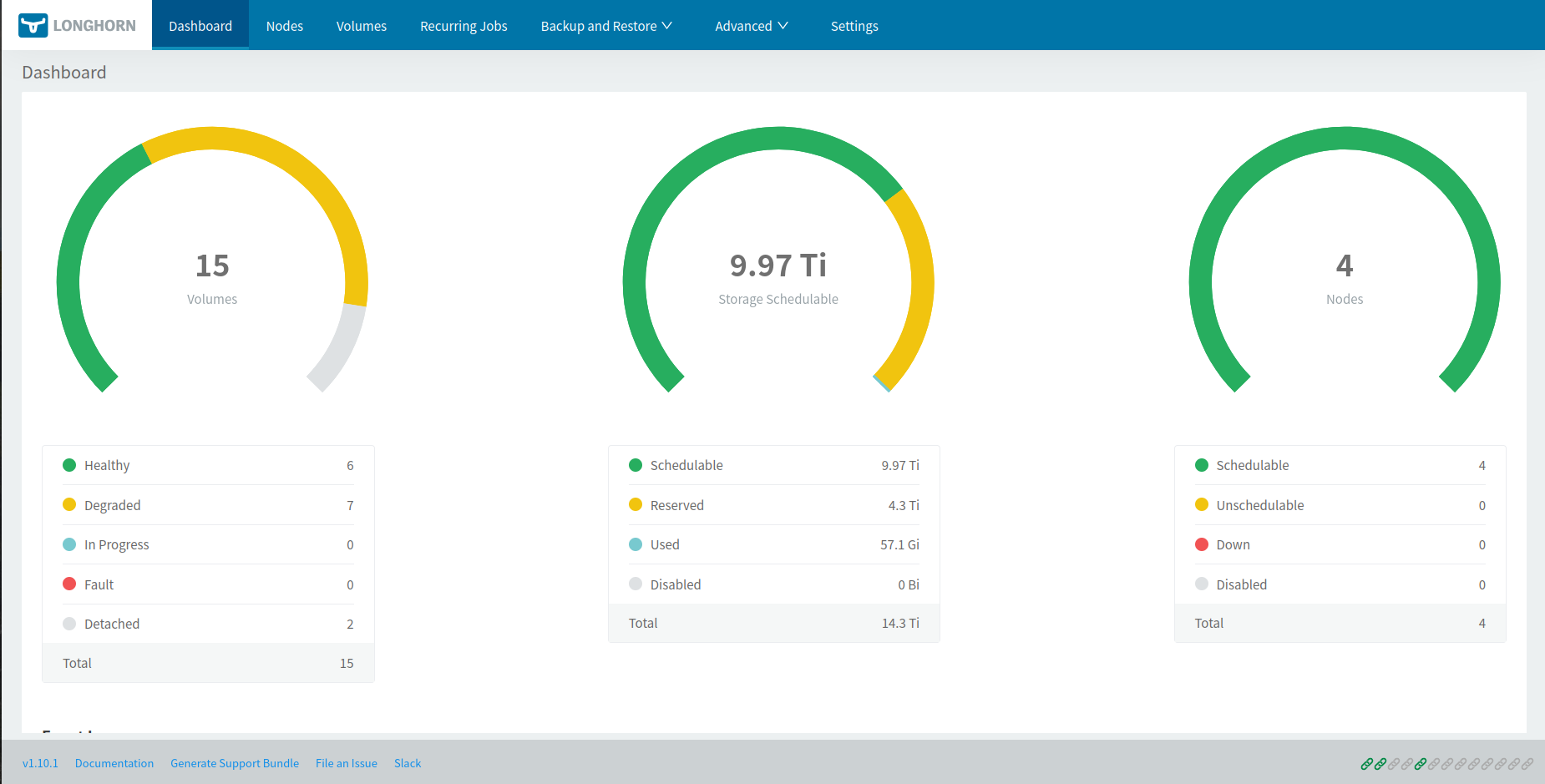
Longhorn was chosen for its native resilience, management UI, and solid k3s integration. With 2 replicas per volume, every piece of data is duplicated across two different nodes — if one Pi goes down, data remains accessible.
Prerequisites on each node
sudo apt install nfs-common open-iscsi util-linux
sudo systemctl enable --now iscsid
sudo modprobe iscsi_tcp
sudo modprobe nbd
echo -e "iscsi_tcp\nnbd" | sudo tee /etc/modules-load.d/longhorn.conf
Install via Helm (from the control plane)
helm repo add longhorn https://charts.longhorn.io
helm repo update
helm install longhorn longhorn/longhorn \
  --namespace longhorn \
  --create-namespace \
  --set defaultSettings.defaultDataPath="/media/DATA"
Set replica count to 2
Longhorn defaults to 3 replicas, which is too many for 3 worker nodes with modest disk capacity. To change this:
- Open the UI via port-forward:
kubectl -n longhorn-system port-forward svc/longhorn-frontend 8080:80 - Go to Settings → General → Default Replica Count and set the value to
2.
Test: create a validation PVC
apiVersion: v1
kind: PersistentVolumeClaim
metadata:
  name: longhorn-test-pvc
spec:
  accessModes:
    - ReadWriteOnce
  storageClassName: longhorn
  resources:
    requests:
      storage: 1Gi
kubectl apply -f test-pvc.yamlIn the Longhorn UI’s Volume tab, the volume should appear as Healthy with 2/2 replicas.
Adding the control plane to storage
By default, the CriticalAddonsOnly=true:NoExecute taint applied during k3s installation prevents Longhorn from scheduling its storage pods on the control plane. To use it as a fourth storage node:
# Check current taints
kubectl describe node cube04 | grep Taints

# Remove the taint (the trailing minus sign means "remove")
kubectl taint nodes cube04 CriticalAddonsOnly=true:NoExecute-
Then prepare the disk on cube04 (format, create /media/DATA, add to /etc/fstab, mount). Longhorn will automatically detect the fourth node.
Disk mount optimisation
On each node with a USB disk, edit /etc/fstab to reduce writes and protect against corruption on power loss:
/dev/sda1 /media/DATA ext4 noatime,nodiratime,sync,errors=remount-ro 0 2| Option | Effect |
|---|---|
noatime | Don’t update file access time on reads — reduces writes |
nodiratime | Same for directories |
sync | Writes happen immediately with no caching — safest on power loss |
errors=remount-ro | On detected corruption, remount read-only instead of corrupting further |
Force a disk check on next boot:
sudo tune2fs -c 1 /dev/sda1Historical Solutions
v1 — RAID 5 over NBD
Idea: mount a USB disk on each worker, expose them via NBD (Network Block Device) to the control plane, then assemble a software RAID 5 with mdadm to get a single resilient volume.
Setup
On each worker, install and configure the NBD server (/etc/nbd-server/config):
[generic]
    user = root
    group = root
    includedir = /etc/nbd-server/conf.d

[export1]
    exportname = /dev/sda1
    authfile =
On the control plane, connect the remote disks and create the RAID:
sudo nbd-client <IP-cube01> -N export1 /dev/nbd1
sudo nbd-client <IP-cube02> -N export1 /dev/nbd2
sudo nbd-client <IP-cube03> -N export1 /dev/nbd3

sudo apt install mdadm
sudo mdadm --create --verbose /dev/md0 --level=5 \
  --raid-devices=3 /dev/nbd1 /dev/nbd2 /dev/nbd3

sudo mkfs.ext4 /dev/md0
sudo mkdir /media/DATA
sudo mount /dev/md0 /media/DATA
Why it failed: network latency over Gigabit links between Pis is far too high for RAID 5 to be usable. Write response times were unacceptable, and simulating a disk failure showed that RAID reconstruction would have taken several days.
v2 — NFS + mergerfs
Idea: each worker exports its disk over NFS, the control plane mounts all four shares and merges them with mergerfs into a single mount point, which is then re-exported over NFS to the Kubernetes cluster via the CSI NFS driver.
Setup
On each worker:
sudo apt install nfs-kernel-server
sudo mount /dev/sda1 /media/DATA
sudo chown nobody:nogroup /media/DATA
# /etc/exports:
# /media/DATA *(rw,async,no_subtree_check)
sudo exportfs -a
sudo systemctl restart nfs-kernel-server
On the control plane:
sudo apt install nfs-common mergerfs
sudo mkdir /media/cube01_drive /media/cube02_drive /media/cube03_drive /media/cube04_drive

sudo mount -t nfs <IP-cube01>:/media/DATA /media/cube01_drive/ -o rw,nfsvers=3,async
sudo mount -t nfs <IP-cube02>:/media/DATA /media/cube02_drive/ -o rw,nfsvers=3,async
sudo mount -t nfs <IP-cube03>:/media/DATA /media/cube03_drive/ -o rw,nfsvers=3,async
sudo mount /dev/sda1 /media/cube04_drive

sudo mergerfs \
  /media/cube01_drive:/media/cube02_drive:/media/cube03_drive:/media/cube04_drive \
  /media/DATA/ -o allow_other
On the Kubernetes side, installing the CSI NFS driver and creating a default StorageClass:
helm install csi-driver-nfs csi-driver-nfs/csi-driver-nfs \
--namespace kube-system --version v4.9.0apiVersion: storage.k8s.io/v1
kind: StorageClass
metadata:
name: nfs-cluster
provisioner: nfs.csi.k8s.io
parameters:
server: cube04
share: /media/DATA/
reclaimPolicy: Retain
volumeBindingMode: Immediate
allowVolumeExpansion: truekubectl patch storageclass local-path \
-p '{"metadata": {"annotations":{"storageclass.kubernetes.io/is-default-class":"false"}}}'
kubectl patch storageclass nfs-cluster \
-p '{"metadata": {"annotations":{"storageclass.kubernetes.io/is-default-class":"true"}}}'Why it failed: mergerfs exposes a single unified volume with no replication — if one disk fails, all data stored on it is lost. After an actual disk failure, the entire storage became inaccessible. Zero fault tolerance.
v3 — GlusterFS
Idea: GlusterFS is a distributed filesystem with native replication. With replica 2, every data block is mirrored across two different nodes.
Setup
On each node:
sudo apt install -y glusterfs-server
sudo systemctl enable --now glusterd

sudo mkfs -t ext4 /dev/sda1
sudo mkdir -p /media/glusterfs
echo "/dev/sda1 /media/glusterfs ext4 defaults 0 0" | sudo tee -a /etc/fstab
sudo mount -a
From one node, form the cluster and create the replicated volume:
sudo gluster peer probe cube01
sudo gluster peer probe cube02
sudo gluster peer probe cube03

sudo gluster volume create gv0 replica 2 transport tcp \
  cube01:/media/glusterfs/brick1 \
  cube02:/media/glusterfs/brick2 \
  cube03:/media/glusterfs/brick3 \
  cube04:/media/glusterfs/brick4 force

sudo gluster volume start gv0
On each node, mount the shared volume:
sudo apt install -y glusterfs-client
sudo mkdir -p /mnt/gluster
sudo mount -t glusterfs cube04:/gv0 /mnt/gluster
On the Kubernetes side, a PersistentVolume pointing directly to /mnt/gluster — functional, but with no dynamic provisioning.
Why it failed: write performance was extremely poor, even worse than NFS. GlusterFS is not designed for Gigabit links between Raspberry Pis, and the replication overhead made it unusable for real workloads like Immich or Gitea.